Troubleshooting
Common gotchas and fixes. Still stuck after this? Drop in the EF Discord (not in the Discord? join at discord.gg/electricforest first) — we're happy to help.
"My friends can see each other's messages and I see theirs — but they can't see mine."
This is the most common Meshtastic issue, and it's almost always the same cause: your node identity got reset (usually after a firmware update).
Every Meshtastic node has a unique identity stored in Settings → Security. Your friends' radios remember this identity and use it to decrypt your messages. If yours changes (because you updated firmware or factory-reset), they're trying to decrypt with the old one.
Fix: Have everyone in your squad open the Meshtastic app, tap the Nodes tab, find your node, and tap Delete node. Their radios will re-fetch your new identity automatically. Done.
To prevent it next time:
- Open the Meshtastic app.
- Settings → Security.
- Screenshot the encryption value shown there. Save it to your phone's notes app.
- If a firmware update wipes it, paste the saved value back in.
"I'm not seeing many nodes or messages."
A few things to check:
- Get higher. Walls, backpacks, even bodies attenuate the signal. Hold your node up high.
- Give it time. The mesh takes a few minutes to "settle" and find optimal paths. Be patient on a fresh setup.
- Recheck your settings. Make sure they actually saved — your radio might have been disconnected from the app when you hit Save. Confirm by reopening the settings.
- Drive around. If you're testing at home, drive a few blocks and see what nodes pop up. Stationary at home you might just be in a dead spot.
- Get a second node. Two-node testing is the minimum to actually verify your setup. Buy a cheap second WisMesh Tag and have a friend take it for a walk.
"My radio won't connect to my phone."
- Force quit and reopen the Meshtastic app.
- Toggle Bluetooth off and on on your phone.
- Restart your radio. Hold the power button to reboot.
- Forget and re-pair. In your phone's Bluetooth settings, forget the Meshtastic device, then re-pair from the app.
"I changed a setting and now everything is broken."
The most common breakage points:
- Device Role changed to anything other than Client. Set it back to
Client. Save. Wait for reboot. - Region changed off United States. Set it back to
United States. (Required for legal 915 MHz operation in the US.) - Frequency Slot changed from 0. Set it back to
0. - Preset changed from Medium Range - Fast. Set it back to
Medium Range - Fast. (Note: the Meshtastic default isLong Range - Fast— the Forest community runs Medium Fast instead because we're packed close together. See Recommended Settings for the reasoning.)
If you really borked things, factory-reset the radio (long-press button or via the app), then re-scan the EF channels QR from scratch. Five-minute fix — preset is baked into the QR, so no manual flip needed.
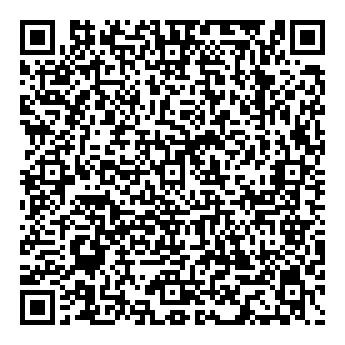
Scan this from a second phone if you've already nuked the link on yours.
"My battery is dying way faster than I expected."
- Turn off device buzzers and vibrations in External Notifications (see Recommended Settings).
- Increase the Position Broadcast Interval to 1 hour or longer.
- Disable Device GPS and use your phone's GPS instead (saves significant battery).
- Lower screen brightness if your radio has a screen.
- Carry a power bank. Festival days are long.
"Where are the other Forest folks?"
Mesh propagation depends on density. Before the festival kicks off, the mesh is sparse. As more people arrive and turn on radios, the network grows organically. Don't panic if Wednesday afternoon is quiet — by Friday night it'll be lively.
Drop into the EF Discord Meshtastic thread (not in the Discord? join at discord.gg/electricforest first) to find folks who are already on-grounds.
"My GPS isn't getting a fix."
- Get outside, away from buildings/trees. GPS needs sky.
- Be patient on cold start. First fix can take 5–15 minutes on a fresh radio.
- Check that GPS is enabled in Position settings (see Recommended Settings).
- Fall back to phone GPS. If your radio's GPS is unreliable, enable Phone GPS Sharing in the Meshtastic app. Set your phone's location permission for Meshtastic to Always.
More Resources
- Meshtastic official docs — Introduction — the canonical Meshtastic reference
- Best Meshtastic Nodes of 2025 — Ham Radio Crash Course — great hardware comparison video
- Find your local Meshtastic community — test your setup with locals before Forest
Still Stuck?
Not in the Discord? Join at discord.gg/electricforest first.